Handwritten script font for creative Windows projects
Onelove by Onelove is a stylized handwritten script font that adds a personal, organic voice to desktop graphics and documents. It ships as a TrueType Font so designers can install and scale it across Windows applications and design suites. The typeface uses fluid cursive strokes and distinctive character shapes, optimized for legibility in creative headings and short text blocks. It targets graphic designers, social media creators, and hobbyists who want a signature, non-formal look for invitations and posts; its lightweight file size keeps it compatible with typical desktop workflows.
What the font changes about desktop typography
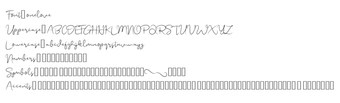
The font supplies a handwritten, cursive voice that mimics natural penmanship, introducing an organic, signature-like feel to titles, logos, and decorative text. The design places emphasis on fluid strokes and casual letter connections, which set it apart from system faces. That handwriting character is aimed at projects that require a personal or informal tone rather than formal, neutral typography.
How much typographic control the font exposes
The font provides a basic, complete character set with uppercase and lowercase letters, numerical digits, and standard punctuation. Distribution as a TrueType Font enables straightforward scaling and consistent rendering across applications. Designers should note it may not contain extensive multilingual support or advanced ligatures, so typographic variation is limited. Included glyph groups:
Uppercase and lowercase letters
Numerals
Basic punctuation
Whether the font affects system performance or workflow
Onelove is described as a lightweight file, which means installing it imposes minimal resource overhead on a desktop. The TrueType format ensures compatibility with common Windows tools such as Microsoft Office and Adobe Creative Cloud, so adding the font behaves like any standard system font resource and does not require extra background processes. For everyday use it integrates with existing document and graphics workflows without additional tooling.
How straightforward installation and daily use are
Installation follows a familiar ZIP extraction and font install process: extract the .ttf file, right-click it, and choose Install to make the font available to applications. The developer distributes the typeface through popular typography repositories, which simplifies access for hobbyists and designers. After installation the font appears in application font menus so you can apply it directly to text layers and paragraph styles.
Best for short, decorative text and quick branding tasks
Onelove is a practical choice for designers and creators who need a handwritten signature for short, display uses because its distinctive character shapes support decorative treatments. It is not intended as a substitute for extended body text or broad multilingual output. For reliable results, define heading or character styles in your design templates and pair the font with a neutral sans to carry longer passages.
Pros
Handwritten cursive strokes that mimic natural penmanship
Includes uppercase, lowercase, numerals, and basic punctuation
Distributed as TrueType for wide application compatibility
Lightweight file size with high Windows compatibility
Cons
May lack extensive multilingual glyphs and advanced ligatures
Limited typographic variants compared to professional font families
Optimized for short display text, not long body copy
Requires manual extraction and installation from a ZIP file
Laws concerning the use of this software vary from country to country. We do not encourage or condone the use of this program if it is in violation of these laws. Softonic may receive a referral fee if you click or buy any of the products featured here.